
Transport rule signatures vs Outlook add-ins: the trade-offs
There are two places a company email signature can be added in Microsoft 365: on the server after the email is sent, or in Outlook while it is being written.
Server-side (a mail flow rule, or a third-party service that routes your mail through its cloud) catches every email from every device and app. The price is that nobody sees the signature while writing, and it lands at the bottom of reply threads.
Client-side (an Outlook add-in) puts the signature exactly where a person would, under their reply, visible before sending and saved in Sent Items, without touching mail flow. The price is that it only works in Outlook.
Neither is better in every case. This post explains how each works, compares them side by side, and suggests which fits which kind of organisation.
How each one works
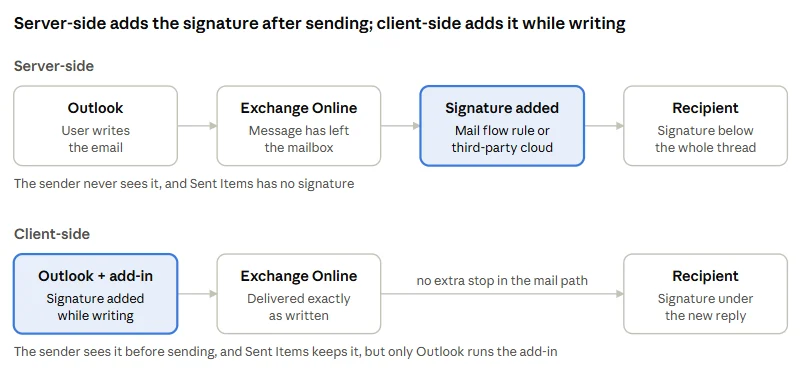
With a server-side setup, the email leaves Outlook without a signature. Exchange Online then applies a mail flow rule, or a connector sends the message to a third-party service that adds the signature and hands it back for delivery. Because this happens after sending, the signature is attached to the end of the whole message, including any quoted thread.
With a client-side setup, an add-in deployed to everyone's Outlook inserts the signature into the draft as the person writes. The email then travels through Exchange Online exactly as written. Nothing extra sits in the mail path, but anything sent from outside Outlook goes without a signature.
Side by side
Server-side (mail flow rule or third-party routing) | Client-side (Outlook add-in) | |
|---|---|---|
Where the signature lands in a reply | At the end of the message, below the quoted thread | Under the new reply, where a person would put it |
Sender sees it while writing | No | Yes |
In the sender's Sent Items | No | Yes |
Mail from non-Outlook apps (Apple Mail, scanners, SMTP relays, line-of-business apps) | Yes, every message passing through Exchange Online | No |
Outlook for iOS and Android | Yes | Yes, with a recent app version (4.2352.0 or later) |
Shared mailboxes on mobile | Yes | No, add-ins don't run there |
Encrypted or signed messages | Can't be modified: wrapped, skipped or rejected, depending on the fallback setting | Added before sending, so included |
Changes to mail flow | A rule; third-party services also add connectors that route mail through their cloud | None |
Who processes the message | Exchange Online, plus the third party if one is used | Exchange Online only; the add-in's service supplies the signature, but the email itself is never routed through it |
Per-person personalisation | Limited tokens in a rule (name, title, phone and so on); richer with a third-party service | Full, from directory attributes |
Rollout and rollback | Rule changes apply to all mail immediately | Publish to a pilot group first; nothing breaks mail delivery if it goes wrong |
Sources: Mail flow rule actions in Exchange Online, Implement event-based activation in Outlook mobile add-ins and Shared folders and shared mailbox scenarios (Microsoft Learn).
Which should you choose?
Server-side fits best if:
- a lot of your mail is sent from outside Outlook: scanners, CRMs, ticketing systems, Apple Mail users
- staff regularly send as shared mailboxes from their phones
- you are comfortable with the signature appearing at the bottom of threads and not in Sent Items
Client-side fits best if:
- nearly everyone uses Outlook, on desktop, web or mobile
- you want signatures to look like a person wrote them, in the right place in replies
- you don't want to change mail flow or send your email through a third party's cloud
- senders need to see and trust what they are sending, for example in legal, finance or sales teams
Many organisations do both. An add-in handles Outlook, and a mail flow rule acts as a safety net with an exception that skips any message already carrying the signature. Mail from scanners and other apps still gets stamped; Outlook users get the version in the right place.
Where Sigil fits. Sigil is client-side only, and says so plainly: it has no server-side mode, so mail sent from outside Outlook doesn't get a signature. In return it never touches mail flow, never reads or stores email content, and reports which mailboxes have actually applied their signature. It costs £0.70 per mailbox per month, shared mailboxes are free, and there's a 14-day free trial with no card needed.
Comparing specific tools? See Sigil vs Exclaimer and Sigil vs CodeTwo.